
Download Style Flocker – Free InDesign Style Manager for Windows & Mac
Overview and Quick Start Guide
Style Flocker is a lightweight, free utility designed specifically for Adobe InDesign users who need to create, organize, and reuse paragraph and character styles across multiple documents. First introduced to the Design & Photography catalog in 2007, the tool has accumulated over 1,500 downloads and remains a trusted companion for layout designers, freelancers, and publishing houses. The current version (1.0.1) was last updated on May 17 2007, and it runs on both macOS (including older Mac OS X releases) and Windows platforms. Despite its age, the program’s core functionality—exporting styles to XML, importing them back into InDesign, and synchronizing style libraries—remains relevant for anyone looking to speed up repetitive formatting tasks.
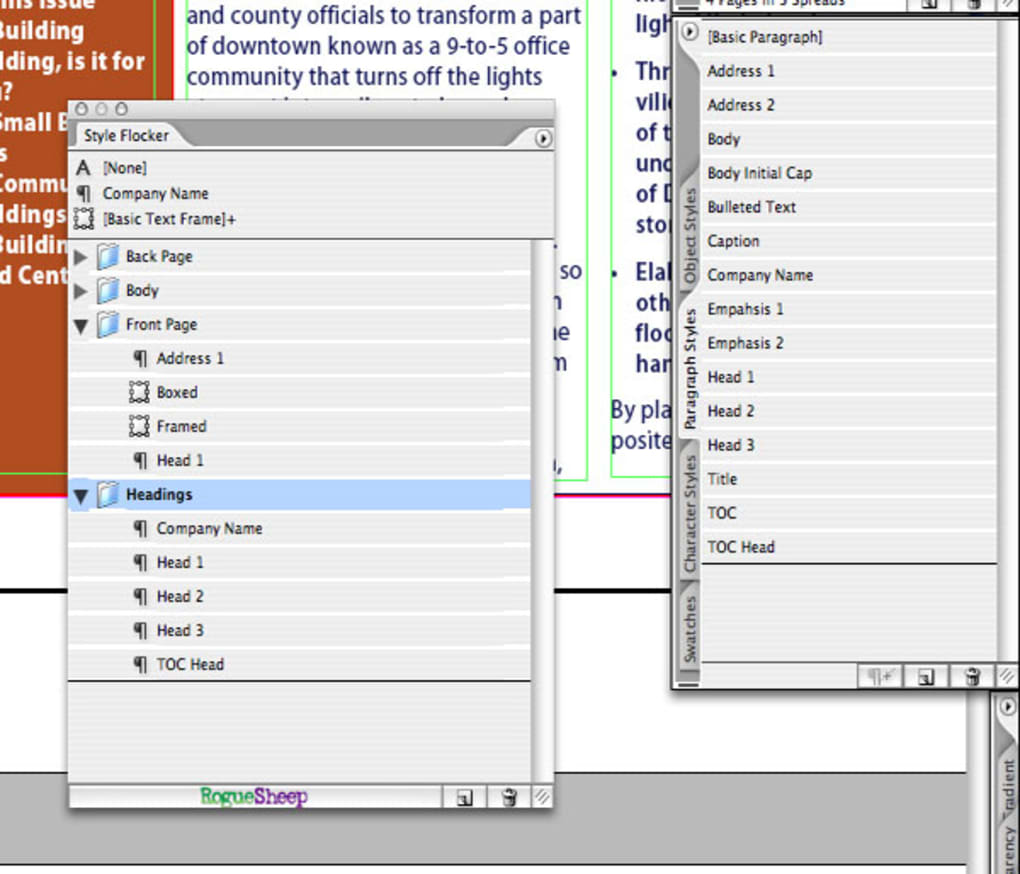
Getting started with Style Flocker is straightforward. After you download the installer, run the setup wizard, which guides you through a typical three‑step process: accept the license agreement, choose an installation folder (the default location occupies less than 10 MB of disk space), and finish the installation. Once installed, launch the application; you’ll be greeted by a clean interface that mirrors InDesign’s own style panels.
To export a style set, simply select the desired paragraph or character styles within InDesign, click the “Export to Style Flocker” button, and choose a destination folder. The tool creates an XML file that can be imported into any other InDesign project, ensuring consistency across your entire publishing workflow. Importing works the same way—point the utility to an existing XML file, preview the contained styles, and click “Import.” The process is secure, as the XML format does not execute code, and the application never requires an internet connection, preserving the privacy of your design assets.
Because Style Flocker is free, there are no hidden fees or subscription models. The developer provides a single download package that includes both the Windows executable (.exe) and the macOS bundle (.app). Users can also access a brief online manual that explains advanced options such as batch exporting and style conflict resolution. Overall, Style Flocker offers a no‑cost, low‑maintenance solution for designers who want to keep their InDesign styles organized without purchasing expensive third‑party plugins.
Powerful Features of Style Flocker
- Export & Import XML Style Files: Seamlessly transfer paragraph and character styles between InDesign documents using a clean XML format.
- Batch Processing: Select multiple style groups at once and export them in a single operation, saving hours of manual work.
- Style Conflict Resolver: When importing, the tool highlights duplicate or conflicting style names and lets you choose to overwrite, rename, or skip.
- Cross‑Platform Support: Fully compatible with both macOS (including legacy Mac OS X) and Windows, ensuring teams on different operating systems can share style libraries.
- Lightweight Installer: The entire application occupies less than 10 MB, leaving ample free space for larger design assets.
- Secure, Offline Operation: No internet connection is required; all style data stays on your local machine, protecting confidential project information.
- Simple UI Aligned with InDesign: The interface mirrors InDesign’s native style panels, reducing the learning curve for new users.
- Free and No‑Ads Policy: The program is completely free to download and use, with no hidden advertisements or trial periods.
- Automatic Version Check: Although updates are infrequent, the app can check for newer releases and notify you when a newer version becomes available.
Each feature is designed with the workflow of a professional designer in mind. For example, the batch processing capability allows a studio handling dozens of magazine layouts to export a master style set once and then apply it to all new issues without recreating styles manually. The conflict resolver is particularly valuable when multiple designers work on the same project and unintentionally create similarly named styles; Style Flocker presents a clear dialog that lets you keep the best version or rename conflicting entries, preserving the integrity of your design system.
Because the tool relies on standard XML, the exported files are human‑readable and can be edited with any text editor if you need to make quick adjustments outside of InDesign. This openness also means that developers can integrate Style Flocker into custom pipelines, such as automated build scripts that generate style libraries for large publishing houses. The combination of simplicity, cross‑platform reliability, and robust feature set makes Style Flocker a unique niche solution that fills a gap left by more expensive, feature‑bloat plugins.
System Compatibility, Pros and Cons
Style Flocker runs on macOS (including older Mac OS X versions) and Windows (XP, Vista, 7, and later). The program requires Adobe InDesign CS5 or newer to access the style APIs, but it does not depend on any additional runtime libraries, making it a hassle‑free addition to any design workstation.
Pros
- Completely free with no hidden costs.
- Very small download size; conserves disk space.
- Works offline, ensuring data privacy.
- Intuitive UI that mirrors InDesign, minimizing training time.
- Robust XML export/import that can be integrated into custom workflows.
- Cross‑platform support eliminates the need for separate Windows and Mac tools.
Cons
- Last major update was in 2007, so UI feels dated compared to modern plugins.
- No native support for InDesign’s newer Cloud‑based libraries.
- Lacks advanced features such as style versioning or cloud syncing.
- Documentation is limited to a brief online manual.
Overall Rating: 4 out of 5 stars
Style Flocker excels at what it promises—providing a free, reliable way to manage InDesign styles across projects. While the interface could benefit from a visual refresh, the core functionality remains solid and valuable for both freelancers and larger teams.
Frequently Asked Questions
Is Style Flocker compatible with the latest version of InDesign?
Yes. Style Flocker works with InDesign CS5 and newer, including the latest Creative Cloud releases. The tool uses InDesign’s public style APIs, which remain stable across versions.
Can I use Style Flocker on a Mac with Apple Silicon (M1/M2) chips?
The macOS bundle runs under Rosetta 2, so it works on Apple Silicon machines. Performance is comparable to native Intel builds, and the small footprint ensures smooth operation.
Do I need an internet connection to export or import styles?
No. All export and import actions happen locally. The XML files are stored on your hard drive, and no data is sent to external servers, keeping your design assets secure.
What file format does Style Flocker use for exported styles?
Exports are saved as plain‑text XML files. This format is both human‑readable and compatible with other design tools that support XML style definitions.
Is there any cost for future updates?
Style Flocker is completely free. The developer has stated that any future updates will also be released at no charge.
Conclusion – Download Style Flocker Today
For designers who spend countless hours recreating paragraph and character styles across multiple InDesign projects, Style Flocker offers a pragmatic, no‑cost solution that streamlines the process. Its lightweight footprint, cross‑platform support, and straightforward XML workflow make it an essential utility for anyone looking to boost productivity without investing in pricey plugins. While the interface could use a modern facelift and the feature set is intentionally simple, the reliability and security of an offline, ad‑free tool outweigh these minor drawbacks. If you’re ready to bring order to your style library and accelerate your layout workflow, click the download button below and start managing your InDesign styles with confidence.







